1. Project Overview
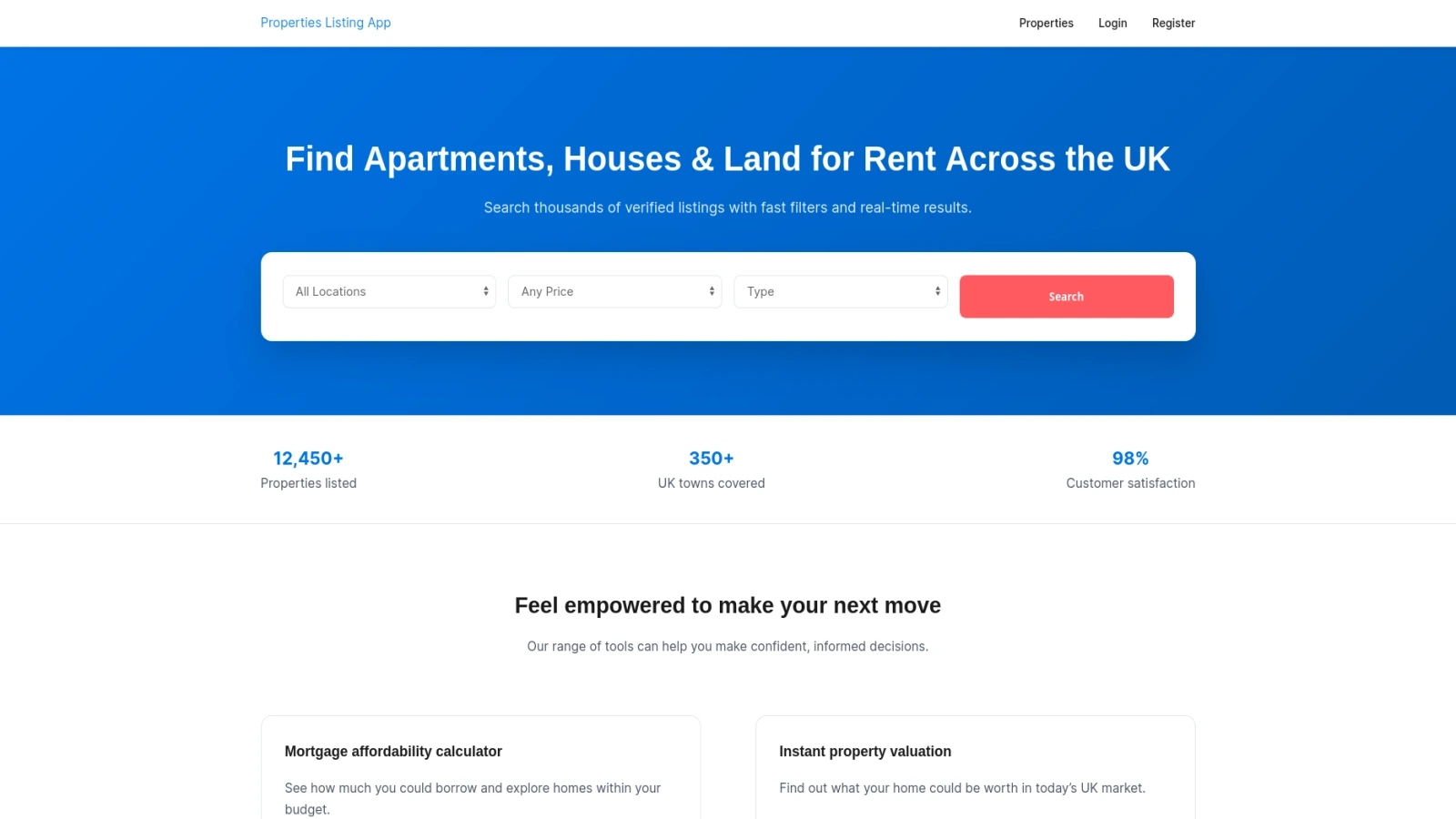
This WordPress Real Estate Development Case Study presents a full-scale property management MVP built using custom plugins, structured architecture, and a clean separation of concerns.
The system was designed for a real estate business that needed:
-
Property listing management
-
Tenant portal with approval flow
-
Lease tracking
-
Stripe-based rent payments
-
Maintenance workflow
-
Admin reporting dashboard
-
Google Maps integration
Unlike typical WordPress listing websites, this project evolved into a mini Buildium/AppFolio-style property management system.
1.1 Client Requirements
The core requirements included:
-
Only admin/owner can create, update, delete properties
-
Property types: house, apartment, land
-
Hero search and filtering system
-
Tenant registration & approval
-
Stripe-only rent payments
-
Maintenance ticket workflow
-
Document upload system
-
Admin finance reporting
-
Messaging system
1.2 Business Goals
The main goal was to:
-
Replace manual property tracking
-
Centralize lease and payment management
-
Improve tenant communication
-
Build a scalable foundation for future SaaS expansion
2. Technical Architecture Strategy
2.1 Why WordPress for Property Management
WordPress was selected because:
-
Rapid MVP development
-
Built-in user role system
-
Plugin extensibility
-
Strong ecosystem
-
Easy deployment
However, this was not built as a blog site. The default WP posts system was heavily customized and extended.
2.2 Theme vs Plugin Responsibility Separation
One major architectural decision was:
✔ Keep UI inside theme
✔ Move business logic to plugins
✔ Separate database operations
✔ Avoid bloated functions.php
Initially, too much logic lived in functions.php. Later, it was refactored into structured plugins following MVC/MVP architecture.
This improved:
-
Maintainability
-
Debugging
-
Scalability
-
Code readability
3. Custom Plugin Engineering Approach
3.1 bjr-real-estate-manager Plugin
This plugin handles:
-
Property CRUD
-
Admin property UI
-
Owner assignment
-
Media handling
-
Repository integration
Folder structure:
/models
/controllers
/services
/repositories
/templates
/assets
This follows industry-standard architecture and avoids WordPress core conflicts.
3.2 Property Management Core Plugin
Responsible for:
-
Lease tables
-
Payments table
-
Maintenance table
-
Transaction tracking
-
Revenue reports
Important design decision:
👉 Revenue is calculated only from payments table
Not from leases or properties.
This ensures financial data integrity.
3.3 Property Messaging MVP
A lightweight custom plugin enabling:
-
Tenant ↔ Admin chat
-
Admin dashboard message panel
-
Simple MVP logic (expandable later)
4. Property Listing & CRUD System
4.1 Admin-Only Property Creation
Only admin/owner roles can:
-
Add properties
-
Edit properties
-
Delete properties
-
Upload featured images
Additional fields added:
-
Bedrooms
-
Bathrooms (for house type)
-
Location
-
Price
-
Property type
4.2 WP_List_Table Implementation
Admin interface uses:
-
WP_List_Table -
Thumbnail previews
-
Pagination
-
Edit/Delete actions
-
Owner column display
This delivers a professional, business-level admin experience.
4.3 Media & Featured Image Handling
A custom table for property media was extended with:
ALTER TABLE wp_bjr_property_media
ADD COLUMN attachment_id bigint(20) UNSIGNED NULL,
ADD COLUMN description text NULL,
ADD COLUMN sort_order int DEFAULT 0;
This ensures:
-
WordPress media compatibility
-
Custom sorting
-
Better future gallery features
5. Tenant Portal System
This is one of the most advanced parts of the system.
5.1 Authentication & Approval Flow
Workflow:
-
Tenant registers
-
Account stays pending
-
Admin manually approves
-
Only then dashboard access is granted
Admin cannot log in via tenant page.
This prevents role confusion.
5.2 Tenant Dashboard
Features:
-
Personal lease records
-
Payment history
-
Due payment option
-
Maintenance tracking
-
Document upload
-
Messaging system
Each tenant sees only their own data.
5.3 Document Upload System
Frontend form → AJAX → admin-ajax.php → hooked PHP function
Example hook:
add_action('wp_ajax_pms_upload_document', 'pms_upload_document_handler');
Security includes:
-
Nonce verification
-
File sanitization
-
Custom DB storage
6. Stripe Integration & Rent Payments
6.1 Sandbox Environment
Stripe sandbox integration allows:
-
Secure rent payment
-
Transaction recording
-
Payment status tracking
PayPal intentionally excluded for MVP simplicity.
6.2 Payment History & Revenue Logic
Revenue system:
-
Based only on payments table
-
CSV export available
-
Late fee UI ready (Phase 2)
7. Maintenance Request Workflow
Tenants can:
-
Submit requests
-
Edit/delete before resolution
-
Track status (Open → In Progress → Resolved)
Admin module built using custom UI renderer in:
Blankslate_render_maintenance_admin_page()
Later refactoring recommendation:
👉 Move UI out of functions.php into plugin templates.
8. Lease & Financial Module
8.1 Lease CRUD
Admin creates leases based on published properties and assigns to tenants.
Each lease includes:
-
Lease start date
-
Move-in date
-
Move-out date
-
Payment structure
Payment starts from lease start date, not move-in.
8.2 Revenue Based on Payments Table
No complex financial joins.
Clean logic:
-
Sum(payments.amount)
-
Filter by status
-
Export CSV
Simple = reliable.
9. Google Maps & Premium API Integration
Admin dashboard → Settings → PM Settings
Google Maps Premium API key stored securely.
Properties display:
-
Map markers
-
Location accuracy
-
Search filtering support
10. Security & Debugging Strategy
Enabled debugging during dev:
define('WP_DEBUG_DISPLAY', true);
@ini_set('display_errors', 1);
Handled:
-
Fatal plugin errors
-
Permission bugs
-
Table prefix differences in production
11. Docker-Based Development Workflow
Used Docker containerized environment:
docker exec -it wordpress_project-wordpress-1 bash
Benefits:
-
No external MySQL required
-
Clean resets
-
Safe local testing
-
Database isolation
12. Performance & Optimization Decisions
-
Lazy loading images
-
Clean asset loading
-
Removed outdated SEO hacks
-
Removed unnecessary rewrite rules
-
Cleaned bloated functions.php
13. Challenges Faced & Solutions
| Challenge | Solution |
|---|---|
| WordPress 6.8 bug | Upgraded to 6.9 |
| Registration mismatch error | DB reset |
| Blank post UI | Core reinstallation |
| Table prefix mismatch in production | Verified wp-config prefix |
| functions.php overload | Plugin refactor |
14. Scalability & Future Roadmap
Phase 2 Ideas:
-
AI rent pricing
-
Owner portal expansion
-
QuickBooks integration
-
Credit screening API
-
Late fee automation
-
SaaS multi-property support
15. Results & Client Impact
✔ Fully functional MVP
✔ Structured plugin architecture
✔ Stripe payments operational
✔ Clean admin dashboard
✔ Scalable foundation
✔ Deployment at subdomain staging
The system now behaves like a mini property management SaaS platform — not just a listing site.
16. FAQs
1. Is this just a property listing website?
No. It includes leases, payments, maintenance, messaging, and reporting.
2. Why use plugins instead of functions.php?
For scalability, separation of concerns, and industry-standard architecture.
3. Is Stripe secure?
Yes. It uses Stripe sandbox during development and secure API integration.
4. Can this scale into SaaS?
Yes. The architecture already supports multi-role extension.
5. Is revenue calculated from leases?
No. Revenue is calculated only from the payments table.
6. Can owners access financial reports?
Yes, through restricted dashboard modules.
Conclusion
This WordPress Real Estate Development Case Study demonstrates how WordPress can evolve beyond blogging into a scalable property management system.
Through:
-
Clean architecture
-
Plugin-based development
-
Secure payment integration
-
Structured database design
-
Docker-based workflow
The project proves that WordPress, when engineered correctly, can power professional-grade real estate platforms.