Intent Summary
This guide targets Laravel developers who need to control how many operations can execute simultaneously. It explains Cache::funnel(), how it differs from rate limiting and WithoutOverlapping, how to use it with queued jobs and external APIs, and how to choose an appropriate concurrency limit in production.
Primary keyword: Laravel Cache::funnel()
Related terms: Laravel concurrency limiting, Laravel concurrent jobs, Laravel queue concurrency, Laravel rate limiting, Laravel cache locks, Laravel 13 concurrency, Laravel API concurrency
Outline
| Level | Heading | Purpose | Target Question or Intent |
|---|---|---|---|
| H1 | Laravel Cache::funnel(): Limit Concurrent Jobs Without Redis | Introduce the topic | What is Laravel Cache::funnel()? |
| H2 | Why Controlling Concurrency Matters | Establish the production problem | Why limit concurrent work? |
| H2 | What Is Laravel Cache::funnel()? | Explain the API | How does funnel work? |
| H2 | How Cache::funnel() Works | Explain its mechanics | How does Laravel control slots? |
| H2 | The Four Methods You Need to Know | Explain API methods | What do limit, releaseAfter, block, and then do? |
| H2 | Basic Cache::funnel() Example | Provide implementation | How do I use funnel? |
| H2 | Cache::funnel() With Laravel Queue Jobs | Apply it to queues | How do I limit queued jobs? |
| H2 | Limit External API Concurrency | Solve a common production problem | How can I protect an API? |
| H2 | Use It for AI and LLM Workloads | Address modern workloads | Can funnel control AI requests? |
| H2 | Per-User and Per-Resource Concurrency Limits | Explain dynamic keys | Can each user have a separate limit? |
| H2 | Cache::funnel() vs Rate Limiting | Prevent confusion | What is the difference? |
| H2 | Cache::funnel() vs WithoutOverlapping | Compare locking approaches | When should I use each? |
| H2 | Cache::funnel() vs Laravel Concurrency | Compare Laravel features | When should I use Concurrency::run()? |
| H2 | Choosing the Right Concurrency Limit | Provide practical guidance | How many concurrent jobs should I allow? |
| H2 | Production Considerations | Discuss failures and configuration | What can go wrong? |
| H2 | Common Mistakes to Avoid | Provide troubleshooting | What should developers avoid? |
| H2 | Frequently Asked Questions | Capture long-tail queries | Common Laravel funnel questions |
| H2 | Conclusion | Summarize | What should I use? |
Laravel Cache::funnel(): Limit Concurrent Jobs Without Redis
Modern Laravel applications can process a large number of jobs at the same time. That is useful for performance, but unlimited concurrency can become a problem when those jobs all depend on the same database, third-party API, AI provider, payment service, or other constrained resource.
Laravel's Cache::funnel() provides a way to control that concurrency.
Instead of allowing every worker to execute a particular operation simultaneously, you can define a maximum number of concurrent executions and let Laravel coordinate access through a cache-based concurrency limiter. Laravel's API exposes funnel() through the cache repository, and the limiter supports methods such as limit(), releaseAfter(), block(), and then().
The important idea is simple:
Queues determine how much work can be processed.
Cache::funnel()determines how much of a particular type of work can run at the same time.
That distinction becomes especially useful in production.
Why Controlling Concurrency Matters
Imagine a Laravel application with 20 queue workers.
A new batch of jobs arrives, and all 20 workers begin processing jobs simultaneously.
That sounds efficient.
But suppose every job calls the same external API.
The API may have its own concurrency limits, infrastructure constraints, or capacity requirements. Your application can therefore become "too fast" for the service it depends on.
The result can include:
-
HTTP 429 responses
-
connection failures
-
increased latency
-
overloaded databases
-
excessive CPU or memory usage
-
unnecessary retries
-
expensive API usage
-
cascading failures between services
Increasing queue workers is not always the solution.
Sometimes you need more workers for overall throughput while deliberately restricting one particular operation.
For example:
-
20 queue workers
-
20 jobs available
-
maximum 5 simultaneous calls to an external API
That is the kind of problem Cache::funnel() is designed to address.
What Is Laravel Cache::funnel()?
Cache::funnel() creates a concurrency limiter identified by a name.
A basic example looks like this:
use Illuminate\Support\Facades\Cache;

Cache::funnel('external-api')
    ->limit(5)
    ->block(10)
    ->then(
        function () {
            // Execute the protected operation.
        },
        function () {
            // Could not obtain a concurrency slot.
        }
    );
The external-api name identifies the resource being limited.
The limit(5) call means that the funnel allows up to five concurrent executions.
The mechanism relies on cache locking rather than simply storing an ordinary counter. Laravel's API describes funnel() as a way to funnel a callback for a maximum number of simultaneous executions.
Importantly, using Cache::funnel() does not inherently require Redis. The cache store used by the funnel must support Laravel's lock-provider contract. This means the correct question is not "Do I have Redis?" but rather "Does the cache store I'm using support the required atomic locking behavior?"
How Cache::funnel() Works
Think of a funnel as a limited number of slots.
If you configure:
Cache::funnel('reports')
    ->limit(3);
the funnel has three available concurrency slots.
If three operations are already inside the funnel, another operation cannot immediately enter.
You can decide what happens next.
It can:
-
Wait for a slot.
-
Fail when the waiting period expires.
-
Execute a failure callback.
-
Throw a limiter timeout exception if you choose exception-based handling.
This is different from simply checking a number in the cache because multiple application processes may be competing for the same resource.
For distributed Laravel applications, the cache backend therefore becomes part of the coordination mechanism.
The Four Methods You Need to Know
limit()
limit() defines the maximum number of concurrent executions.
Cache::funnel('image-processing')
    ->limit(4);
This means no more than four executions should hold a concurrency slot for this funnel at the same time.
The correct number depends on the resource you are protecting.
releaseAfter()
releaseAfter() provides a safety timeout for an acquired slot.
Cache::funnel('external-api')
    ->limit(5)
    ->releaseAfter(60);
The value is expressed in seconds.
This is particularly useful for long-running operations because a slot should not remain locked indefinitely if something goes wrong.
Choose a value that is long enough for legitimate operations but not unnecessarily long.
block()
block() determines how long Laravel should wait for an available concurrency slot.
Cache::funnel('external-api')
    ->limit(5)
    ->block(10);
Here, Laravel can wait up to 10 seconds for a slot.
This is useful when you prefer short waiting over immediately abandoning the operation.
then()
then() lets you define what happens when the concurrency lock is acquired and what happens when it cannot be acquired.
Cache::funnel('external-api')
    ->limit(5)
    ->releaseAfter(60)
    ->block(10)
    ->then(
        function () {
            // Slot acquired.
        },
        function () {
            // Slot unavailable.
        }
    );
Laravel also supports handling failure through LimiterTimeoutException when you omit the failure callback.
A Basic Cache::funnel() Example
Suppose your application generates expensive reports.
Without concurrency control, 50 users could potentially trigger report generation at roughly the same time.
You may decide that only three reports should be generated simultaneously:
use Illuminate\Support\Facades\Cache;

Cache::funnel('report-generation')
    ->limit(3)
    ->releaseAfter(300)
    ->block(15)
    ->then(
        function () {
            GenerateReport::dispatch();
        },
        function () {
            // Tell the caller that report capacity is temporarily full.
        }
    );
The exact implementation depends on your application architecture, but the principle is consistent: the funnel protects the constrained operation rather than changing the number of queue workers globally.
Cache::funnel() With Laravel Queue Jobs
This is where concurrency control becomes particularly useful.
Laravel queues are designed to process work in the background, and multiple workers can process jobs concurrently. Laravel's documentation specifically describes running multiple queue:work processes to process jobs concurrently.
Suppose you have a job that calls a third-party service:
class SyncCustomer implements ShouldQueue
{
    public function handle()
    {
        // Call external service...
    }
}
If you have many workers, several SyncCustomer jobs may execute simultaneously.
If the external service should receive no more than five concurrent requests, you can place the constrained operation behind a funnel:
use Illuminate\Support\Facades\Cache;

public function handle()
{
    Cache::funnel('customer-sync')
        ->limit(5)
        ->releaseAfter(120)
        ->block(10)
        ->then(
            function () {
                $this->syncCustomer();
            },
            function () {
                $this->release(10);
            }
        );
}
The important architectural distinction is that the queue can remain highly available while the external operation has a smaller concurrency limit.
When using middleware, retries, or manual releases, remember that Laravel's queue attempt configuration matters. Laravel notes that middleware such as WithoutOverlapping and RateLimited can consume job attempts, so retry settings should be chosen accordingly.
Limit External API Concurrency
One of the most practical uses for Cache::funnel() is protecting external APIs.
Consider an application that imports thousands of records and sends each record to an external service.
You might have enough workers to process hundreds of jobs concurrently, but the external service may need a much smaller concurrency level.
A funnel provides an application-level control point:
Cache::funnel('partner-api')
    ->limit(5)
    ->releaseAfter(90)
    ->block(10)
    ->then(
        fn () => $this->sendToPartner(),
        fn () => $this->retryLater()
    );
This does not replace the external service's documented rate limits.
If the provider says you can make only a certain number of requests per minute, you should still implement appropriate rate limiting.
Concurrency and rate are different constraints.
For example:
-
Concurrency: maximum 5 requests running simultaneously.
-
Rate: maximum 100 requests during a defined time window.
Laravel provides a separate rate-limiting abstraction for controlling actions during a specified time window.
In some applications, you may need both.
Use Cache::funnel() for AI and LLM Workloads
AI workloads are another good candidate.
A Laravel application might generate:
-
text completions
-
embeddings
-
summaries
-
classifications
-
image requests
-
agent tasks
-
document processing jobs
Launching too many expensive operations at once can increase latency and resource consumption.
For example:
Cache::funnel('ai-generation')
    ->limit(5)
    ->releaseAfter(180)
    ->block(20)
    ->then(
        fn () => $this->generateResponse(),
        fn () => $this->retryLater()
    );
The exact limit should come from the requirements and observed behavior of the provider and your application.
If you are using Laravel's AI SDK, remember that caching can also reduce redundant embedding requests for identical inputs. Laravel documents configurable embedding caching as part of the AI SDK.
Concurrency control and caching solve different problems, but they can work together:
Caching reduces unnecessary work.
Concurrency limiting controls how much necessary work happens simultaneously.
Use Per-User and Per-Resource Concurrency Limits
You do not always want one global funnel.
Suppose each customer can run up to two report-generation tasks simultaneously.
You can make the funnel key specific to the user:
Cache::funnel("reports:user:{$user->id}")
    ->limit(2)
    ->block(5)
    ->then(
        fn () => $this->generateReport(),
        fn () => $this->handleCapacityLimit()
    );
Now the concurrency limit is scoped to that user.
The same approach can be useful for:
-
tenant-specific API access
-
customer imports
-
per-account synchronization
-
resource-specific processing
-
expensive background operations
Be deliberate with your keys. The funnel name defines the group of operations competing for the same concurrency slots.
Cache::funnel() vs Rate Limiting
These features sound similar but solve different problems.
| Requirement | Better fit |
|---|---|
| Maximum simultaneous operations | Cache::funnel() |
| Maximum requests during a time window | Rate limiter |
| Prevent the same operation from overlapping | WithoutOverlapping |
| Execute independent tasks concurrently | Concurrency::run() |
| Process work asynchronously | Laravel queues |
Laravel's rate limiter is designed to limit actions during a specified time window. Cache::funnel() instead controls simultaneous execution.
For example, imagine an API allows:
-
60 requests per minute
-
5 requests simultaneously
You potentially need two different controls.
A concurrency limit alone does not mean you have satisfied a per-minute request quota.
Cache::funnel() vs WithoutOverlapping
WithoutOverlapping is useful when you need to prevent a particular job from running at the same time as another job with the same lock key.
A funnel is different because it allows a defined number of concurrent executions.
For example:
Cache::withoutOverlapping(
    'customer-import',
    fn () => $this->importCustomer()
);
is conceptually a one-at-a-time lock.
A funnel can provide controlled parallelism:
Cache::funnel('customer-import')
    ->limit(5)
    ->then(
        fn () => $this->importCustomer()
    );
Laravel's queue documentation also recommends WithoutOverlapping when you only need to limit concurrent processing of a job.
The choice therefore depends on the problem.
If the requirement is:
"Never run these two operations simultaneously."
Use a non-overlapping lock.
If the requirement is:
"Allow up to five operations simultaneously."
A concurrency funnel is the better conceptual fit.
Cache::funnel() vs Laravel Concurrency
Laravel 13 also provides the Concurrency facade.
For example:
use Illuminate\Support\Facades\Concurrency;

[$users, $orders] = Concurrency::run([
    fn () => User::count(),
    fn () => Order::count(),
]);
This feature is designed for executing independent tasks concurrently. Laravel documents process, fork, and sync drivers for its concurrency system.
That is different from Cache::funnel().
Think about the distinction this way:
Concurrency::run() asks:
"How can I execute these independent tasks at the same time?"
Cache::funnel() asks:
"How many executions of this particular operation are allowed at the same time?"
They can therefore solve opposite sides of the same problem.
Choosing the Right Concurrency Limit
There is no universal value such as five, ten, or twenty that works for every application.
Start with the constraint you are trying to protect.
Consider:
External APIs
Check the provider's documentation for concurrency and rate restrictions.
Databases
Monitor connection usage, query latency, locks, and CPU utilization.
AI providers
Consider provider limits, request duration, cost, and application throughput.
CPU-heavy work
Look at available CPU resources and worker utilization.
Memory-heavy jobs
Consider memory per worker rather than simply increasing concurrency.
Multi-tenant applications
Consider whether a global limit could allow one tenant to consume capacity needed by others.
A good concurrency limit is based on observed capacity rather than an arbitrary number.
Production Considerations
Use a shared lock-capable cache store
If multiple application servers need to coordinate access to the same funnel, they need access to the same appropriate cache backend.
A local cache isolated to one machine cannot provide the same cross-server coordination as a shared backend.
Laravel requires the cache store used by funnel() to implement the lock-provider contract.
Set a realistic releaseAfter() value
The safety timeout should account for legitimate execution time.
If a job normally takes 90 seconds and the release timeout is only 30 seconds, you may create a situation where a slot becomes available while the original operation is still running.
That defeats the purpose of the concurrency limit.
Handle unavailable capacity
Do not silently discard work when a funnel cannot be acquired.
Depending on the application, you may:
-
retry later
-
release a queue job
-
return a temporary response
-
log the event
-
record a metric
-
show a capacity message to the user
Monitor the protected operation
A concurrency limit is not a substitute for observability.
Track:
-
execution duration
-
failures
-
retries
-
timeout frequency
-
API responses
-
queue depth
-
worker utilization
Then adjust the limit based on actual production behavior.
Common Mistakes to Avoid
Mistake 1: Confusing concurrency with rate
Five concurrent requests does not mean five requests per minute.
They are separate constraints.
Mistake 2: Assuming Redis is mandatory
Cache::funnel() is exposed through Laravel's cache repository and requires a lock-capable cache store. It is not inherently limited to Redis.
Mistake 3: Setting the limit too high
If the external API can safely handle five concurrent requests, setting the funnel to 50 defeats the protection.
Mistake 4: Setting releaseAfter() too low
A timeout that is shorter than legitimate work can undermine the concurrency guarantee.
Mistake 5: Forgetting queue retry behavior
If a job is released because it could not acquire a slot, make sure the queue's retry and attempt configuration supports the intended behavior.
Mistake 6: Using a global funnel when the resource is tenant-specific
A single global funnel may cause one busy tenant to compete with every other tenant.
Use carefully designed keys when the business requirement is per-user or per-tenant concurrency.
Frequently Asked Questions
What is Cache::funnel() in Laravel?
Cache::funnel() creates a concurrency limiter that restricts the maximum number of simultaneous executions for a named resource. Laravel exposes it through the cache repository and provides methods such as limit(), releaseAfter(), and block().
Does Laravel Cache::funnel() require Redis?
No. The cache store used by the funnel must support Laravel's lock-provider interface. Redis is one possible backend, but the requirement is lock support rather than Redis specifically.
What is the difference between Cache::funnel() and rate limiting?
Cache::funnel() controls how many operations can run simultaneously. Rate limiting controls how many attempts can occur during a specified time window. An application may need both controls.
What does limit() do in Cache::funnel()?
limit() specifies the maximum number of concurrent executions allowed by the funnel.
For example:
Cache::funnel('api')
    ->limit(5);
allows up to five executions to hold concurrency slots at the same time.
What does releaseAfter() do?
releaseAfter() defines a safety timeout, in seconds, after which an acquired concurrency slot is automatically released. Choose a value appropriate for the expected duration of the protected operation.
What does block() do?
block() specifies how long Laravel should wait for an available concurrency slot before treating acquisition as unsuccessful.
Should I use Cache::funnel() with Laravel queues?
It can be useful when queued jobs need controlled parallelism around a shared resource, such as an external API or expensive operation. However, if you simply need to ensure that a particular job does not overlap with another instance, Laravel's WithoutOverlapping middleware may be a better fit.
Is Cache::funnel() the same as Concurrency::run()?
No. Concurrency::run() is designed to execute independent tasks concurrently, while Cache::funnel() limits the number of simultaneous executions of a particular operation. Laravel 13 documents both features separately.
Can I use different funnel limits for different resources?
Yes. The funnel name identifies the resource being limited, so you can define separate funnels for different operations or scopes.
For example:
Cache::funnel('stripe-api')
    ->limit(5);

Cache::funnel('report-generation')
    ->limit(2);
The appropriate limits should be based on the capacity and requirements of each resource.
Should I use both rate limiting and concurrency limiting?
Potentially, yes.
If a service imposes both a maximum number of requests per time period and a maximum number of simultaneous requests, those are different constraints and may require different controls.
Conclusion
Laravel applications often need more than simply "more workers."
Queues provide asynchronous processing and allow multiple jobs to execute concurrently. But the resources behind those jobs may have much lower capacity.
That is where Cache::funnel() becomes useful.
It gives you a way to say:
"This operation can run in parallel, but only up to this many times at once."
For production applications, that can be useful when protecting:
-
external APIs
-
AI and LLM workloads
-
report generation
-
imports
-
database-heavy operations
-
tenant-specific workloads
-
expensive background jobs
The key is to choose the right tool for the problem.
Use queues when work should happen asynchronously.
Use rate limiting when you need to control activity over time.
Use WithoutOverlapping when an operation must not overlap.
Use Concurrency::run() when independent tasks should execute concurrently.
And use Cache::funnel() when you need controlled parallelism around a particular resource.
Laravel's current API supports funnel() directly through the cache repository, making it a useful tool to understand as your application's worker count and workload grow.
Sources
-
Laravel 13 Cache API —
Cache::funnel()and cache concurrency limiter: Laravel Cache API -
Laravel Cache documentation — concurrency limiting and lock requirements: Laravel Cache Documentation
-
Laravel 13 Queue documentation: Laravel Queues
-
Laravel 13 Concurrency documentation: Laravel Concurrency
-
Laravel 13 Rate Limiting documentation: Laravel Rate Limiting
Recommended Internal Links
| Article Section | Anchor Text | Destination | Reason |
|---|---|---|---|
| Queue section | scaling Laravel queues | Existing queue scaling guide | Connect concurrency limits with worker scaling |
| Queue section | Laravel queue worker memory management | Existing worker article | Strengthen queue-performance cluster |
| Production section | Supervisor for Laravel queue workers | Existing Supervisor article | Connect application concurrency with process management |
| AI section | Laravel AI SDK | Existing AI SDK guide | Strengthen AI/Laravel topical authority |
| AI section | Laravel AI background jobs | Existing AI queue article | Connect AI workloads with queue concurrency |
| Deployment section | zero-downtime Laravel deployment | Existing deployment article | Connect production operations |
Suggested Images
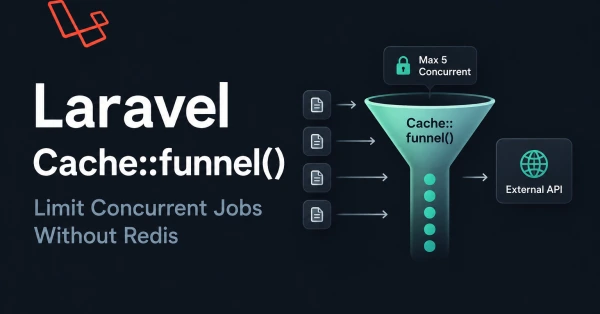
Image 1 — Hero image
-
Placement: Immediately below the introduction
-
Purpose: Visualize the difference between unlimited queue workers and controlled concurrency
-
File name:
laravel-cache-funnel-concurrency.webp -
Alt text: Laravel Cache funnel controlling concurrent queue jobs
-
Ratio: 16:9
-
Prompt: Dark modern developer-focused illustration showing a Laravel application with multiple queue workers feeding into a concurrency funnel with five controlled execution slots, external API on the right, clean architecture diagram, subtle Laravel-inspired red accents, professional technical blog hero image, no excessive text
Image 2 — Comparison diagram
-
Placement: Before "Cache::funnel() vs Rate Limiting"
-
Purpose: Explain concurrency versus rate limiting
-
File name:
laravel-concurrency-vs-rate-limiting.webp -
Alt text: Difference between Laravel concurrency limiting and rate limiting
-
Ratio: 16:9
-
Prompt: Clean technical comparison diagram showing concurrency limiting as simultaneous execution slots versus rate limiting as requests distributed across a time window, Laravel developer documentation style, dark background, minimal labels, professional and easy to understand
Image 3 — Queue architecture
-
Placement: In the "Cache::funnel() With Laravel Queue Jobs" section
-
Purpose: Show workers remaining scalable while a funnel limits one external resource
-
File name:
laravel-queue-funnel-architecture.webp -
Alt text: Laravel queue workers with Cache funnel concurrency control
-
Ratio: 16:9
-
Prompt: Technical architecture diagram showing Laravel application, queue, multiple workers, Cache funnel with five concurrency slots, and protected third-party API, clear arrows and labels, modern dark developer documentation aesthetic, uncluttered composition
Image Recommendation
This article would benefit from approximately 3 images. Would you like me to generate them? Reply "Generate images."
Next Actions
-
Publish this article under
/articles/laravel-cache-funnel-concurrency. -
Add the recommended internal links after confirming the existing destination URLs.
-
Add Article and FAQ schema based only on the visible article and FAQ content.
-
Add the three recommended technical illustrations.
-
Link the article from your existing Laravel queue and AI articles.
-
Monitor impressions and queries around
Laravel Cache::funnel(), Laravel concurrency limiting, and related long-tail searches after publication.